In the modern digital era, entertainment is becoming smarter, faster, and more flexible. Traditional television systems are gradually being replaced by internet-based streaming solutions that give users more control over their viewing experience. AB IPTV Player Laptop is designed for users who want to enjoy their IPTV content on a bigger screen with a smooth, simple, and professional desktop experience.
Download AB IPTV Player Laptop
What is AB IPTV Player Laptop?
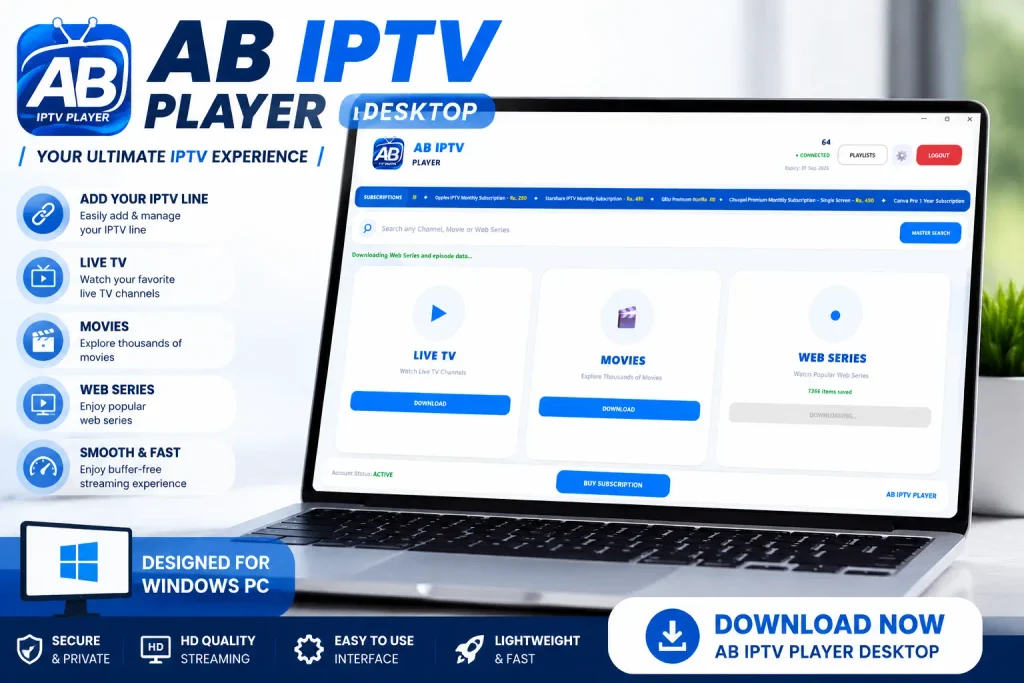
AB IPTV Player Desktop is a Windows-based IPTV media player that allows users to play their IPTV content on a computer. The application works as a dedicated player where users can add their IPTV line and enjoy their subscribed content through a clean and organized interface.
Unlike traditional TV applications, desktop IPTV players provide the flexibility to watch content directly on your PC or laptop without depending on additional hardware devices.
AB IPTV Player Desktop is developed with a focus on simplicity, performance, and a better viewing experience for desktop users.
Key Features of AB IPTV Player Laptop
1. Easy IPTV Line Integration
AB IPTV Player Desktop allows users to easily add their IPTV line and start accessing their available content. The setup process is designed to be simple, making it convenient even for users with limited technical knowledge.
Once your IPTV details are added, you can manage and watch your content from one dedicated application.
2. Large Screen Entertainment Experience
Watching entertainment on a desktop or laptop provides a bigger and more comfortable viewing experience compared to smaller screens.
AB IPTV Player Desktop allows users to enjoy their IPTV content on larger displays with better visibility and a more immersive experience.
3. Clean and Modern User Interface
The application features a simple and organized interface designed for easy navigation.
Users can quickly access different sections, manage their content, and control playback without complicated menus or unnecessary settings.
4. Smooth Video Playback
AB IPTV Player Desktop is designed to provide smooth media playback with reliable performance.
The player focuses on delivering a stable viewing experience while using your available IPTV connection and device performance.
5. Watch Live TV, Movies & Web Series
With AB IPTV Player Desktop, users can access different types of IPTV content depending on their subscription, including:
- Live TV channels
- Movies
- Web Series
- Entertainment content
- Other IPTV-based media
The player provides an organized way to browse and enjoy available content.
6. Windows PC Compatibility
AB IPTV Player Desktop is built for Windows users who prefer watching IPTV content on their computers.
It can be used on:
- Desktop computers
- Personal computers
- Windows laptops
Enjoy your entertainment setup without requiring a smart TV or additional streaming device.
7. Simple Controls & Better Management
A good IPTV player should make entertainment easier. AB IPTV Player Desktop provides simple controls that help users manage their viewing experience comfortably.
From navigation to playback controls, everything is designed with user convenience in mind.
Why Choose AB IPTV Player Desktop?
There are many IPTV solutions available, but a dedicated desktop player provides several advantages:
✔ Comfortable PC Viewing
Enjoy your IPTV content on a larger screen with the convenience of your computer.
✔ Easy Setup
Add your IPTV line and start using the application with a simple setup process.
✔ Professional Interface
A clean and modern design provides a better user experience.
✔ Flexible Entertainment
Access your available IPTV content anytime from your Windows device.
✔ Reliable Performance
Designed to provide smooth operation and efficient playback.
How to Use AB IPTV Player Desktop?
Using AB IPTV Player Desktop is simple:
Step 1:
Download and install AB IPTV Player Desktop on your Windows computer.
Step 2:
Open the application and enter your IPTV line details.
Step 3:
Load your available content and start enjoying your entertainment.
No complicated configuration is required. The application is designed to make IPTV playback simple for everyone.
IPTV Streaming on Your Computer
IPTV technology has changed the way people consume television and digital entertainment. Instead of being limited to traditional broadcasting systems, users can now enjoy flexible streaming options through internet-based platforms.
AB IPTV Player Desktop brings this modern viewing experience to Windows computers by providing a dedicated player where users can manage and play their IPTV content easily.
Whether you are watching from home, working on your PC, or enjoying entertainment during your free time, AB IPTV Player Desktop offers a convenient solution.
AB IPTV Player Desktop – A Smarter Way to Watch
AB IPTV Player Desktop combines simplicity, performance, and modern design to create a reliable IPTV playback experience for Windows users.
With easy IPTV line setup, smooth playback, and a user-friendly interface, it is a practical choice for anyone who prefers enjoying IPTV content on a computer.
Download AB IPTV Player Desktop today and experience a smarter way to enjoy your IPTV entertainment.